A budget app knows what you earn, what you owe and what you spent on Saturday night. Before you type any of that into one, it is fair to ask a simple question: where does it go? For CoreSpend the answer is short, and you can check most of it yourself.
Copy one: on your device
Everything you enter is saved in a database file inside the app, on the device in your hand. That file is the budget. The app reads it and writes to it directly, with nothing in between.
That is why CoreSpend opens at once and works on a plane, in the metro, or on a phone that has never been signed into iCloud. It needs no connection and no sign-in, because there is nothing to sign into.
Copy two: in your own iCloud
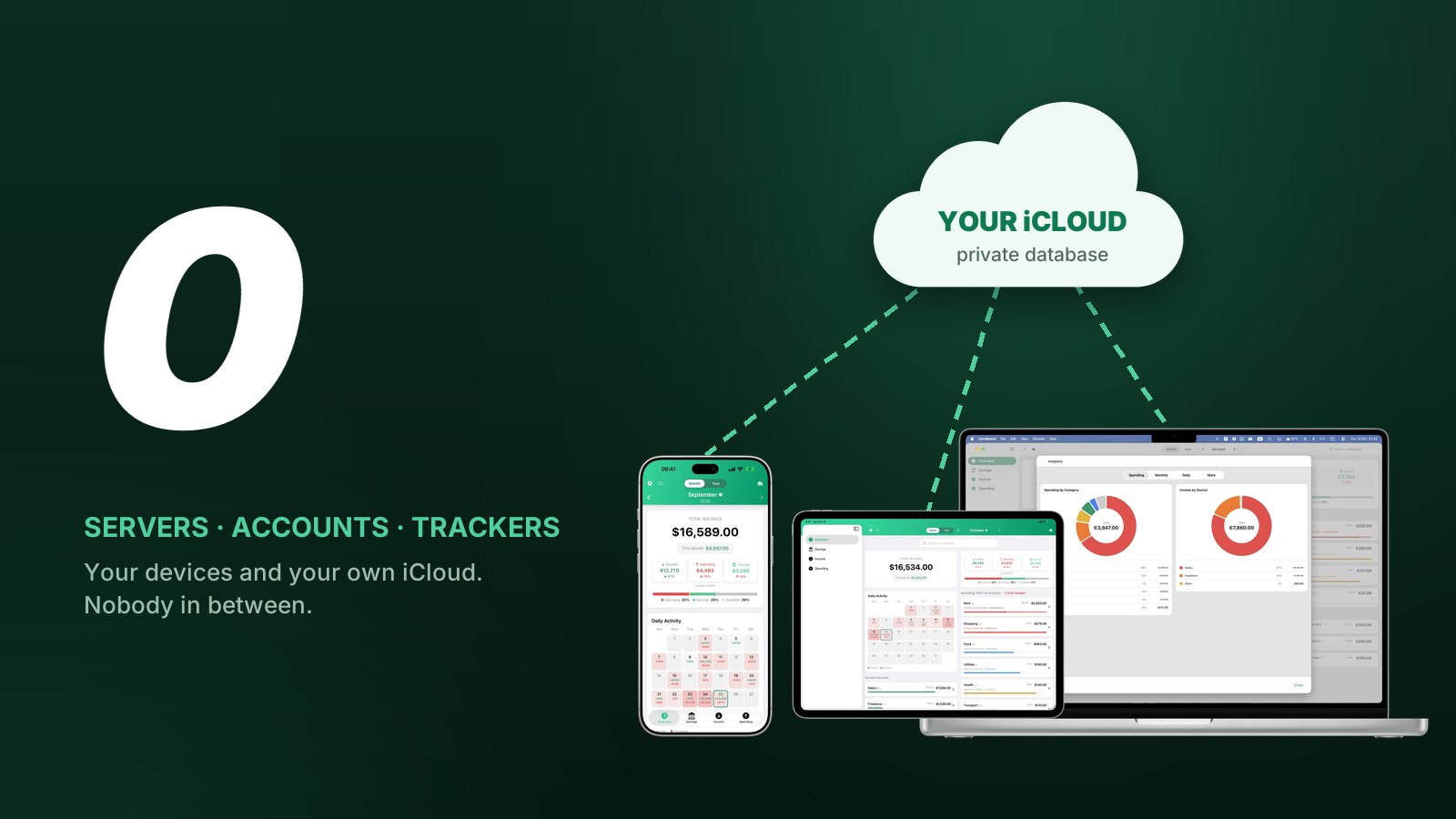
If the device is signed into iCloud, the app keeps a second copy in what Apple calls your private database. Every iCloud user gets one per app, and it belongs to the user, not to the app's developer. Your iPad and your Mac read the same database. That is how a coffee you add on the phone shows up on the Mac a few seconds later.
Look at what is missing from the picture. Most apps that sync run a server of their own. Your data goes there first, and the company behind the app can read it, lose it in a breach, or sell it. CoreSpend has no such server. The lines run from your devices to your iCloud and back, and I am not on any of them.
It also explains why there is no CoreSpend account. Sync uses the Apple Account that is already on the device, so there is no email to hand over and no extra password to leak.
Who can read it
| You | Everything, on every device signed into your Apple Account. |
|---|---|
| Me, the developer | Nothing. Not one transaction, not your name, not your email address. |
| Apple | Stores the iCloud copy, encrypted on the way there and on its servers. Apple keeps the keys. |
| Advertisers and data brokers | Nothing. There is no advertising or analytics code in the app. |
| Bank-link services | Nothing. The app never asks for a bank login, so no go-between company sees your account. |
The Apple line deserves a plain sentence. The iCloud copy is encrypted in transit and on Apple's servers, but it is not end-to-end encrypted: Apple holds the keys, as it does for iCloud under its standard protection. So you are trusting Apple, whose cloud you already use. You are not trusting me, because I have nothing to be trusted with.
What I do get is what Apple gives every developer: how many copies were sold in each country, a count of sync requests with no names attached, and crash reports from people who chose to share them with developers. None of it contains anything you typed.
Other places it can be
- Your device backup. If you back up your iPhone to iCloud or to a computer, the app's file is inside that backup, like every other app's.
- A new device. Sign in with the same Apple Account, install CoreSpend, and the budget comes back from copy two on its own.
- Nowhere else. No newsletter list, no "anonymous usage statistics", no support database with your numbers in it.
The iCloud copy counts toward your iCloud storage, but it is small. A year of daily entries takes about as much room as one photo.
Why it stays at $0.99
A subscription often pays for servers: machines that hold your data and have to be rented every month. CoreSpend has none to rent. Your devices do the work, your iCloud does the syncing, and you paid for both already.
So the price is $0.99, once, and the privacy is not a setting you have to switch on. It is simply how the app is built.